Packing list
- Passport
- Charger
- Boarding pass
same vault key
Enclave is a private knowledge base for desktop and Android. Everything is encrypted at rest, syncs directly over your own Wi‑Fi, and works with no account, no cloud and no telemetry.
Works offline · No account · MIT licensed Press / to jump anywhere
 Enclave
Roadmap Q4
Encrypted
Tick a task, add a line, and watch the page stay saved and encrypted. This preview runs in your browser.
This week
Next: the graph touch targets and a final pass on the editor toolbar.
Two devices on the same Wi‑Fi. Add a note on the phone and watch it reach the desktop without a server.
Peers found on this network. Both hold the same vault key.
Drag the sticky note, or add another. The canvas is a block inside the same encrypted vault.
Hover or tap a page to follow its links. The graph is generated from the page links you already have.
Choose an endpoint you trust. This preview uses sample answers; the app calls only the endpoint you configure.
Sample answers in this preview. In the app, answers come only from the endpoint you configure.
0
cloud servers. Your notes never need one.
1
encrypted vault for pages, blocks, search and embeddings.
12
words recover your vault without a password.
100%
offline by default. Sync and AI are opt-in.
Features
Encryption is not a setting you turn on. It is the shape of the app — from the database file to the frames travelling across your Wi‑Fi.
Local-first
Create, edit and search without a network. Sync is an enhancement, never a requirement — no login, no subscription, no outage that can lock you out of your own notes.
At rest
The entire vault is one SQLCipher database. Argon2id derives the key from your password or 12-word phrase; it never leaves the device.
Sync
mDNS on your network, mutually authenticated, sealed with XChaCha20-Poly1305. No relay, no cloud routing, no middleman.
Write
Tasks, callouts, tables, typed databases, backlinks, split view and Markdown source — all inside the same encrypted document model.
Think
An infinite whiteboard with sticky notes, shapes, connectors, frames and mind maps — plus a graph of how every page connects.
Local AI
The assistant is opt-in and talks only to the endpoint you configure: Ollama, llama.cpp, LM Studio, vLLM — or an API you choose. Embeddings can run fully offline inside the app.
Android · Beta
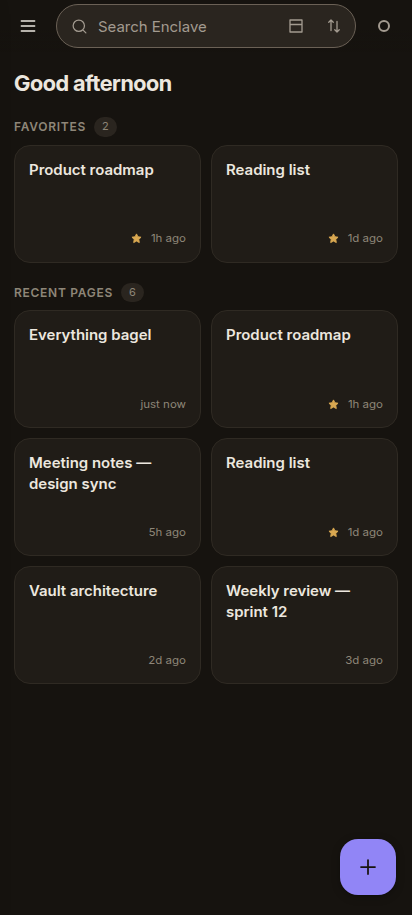
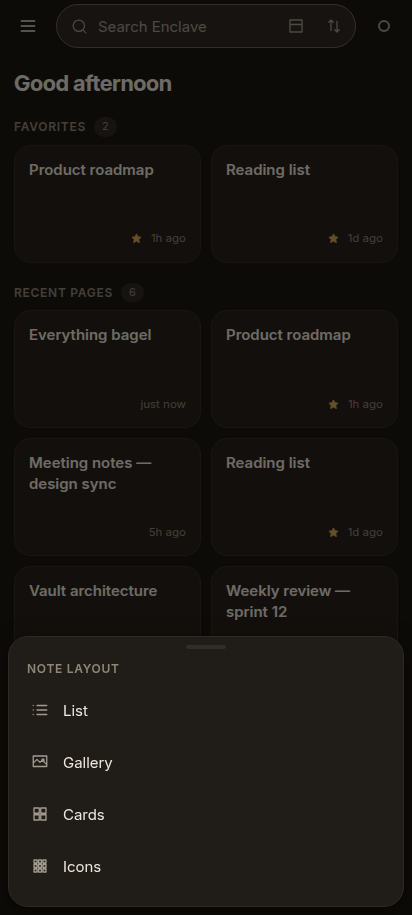
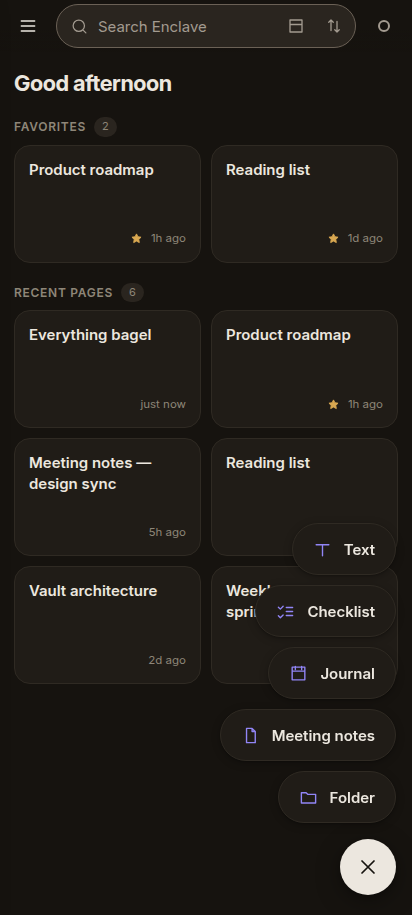
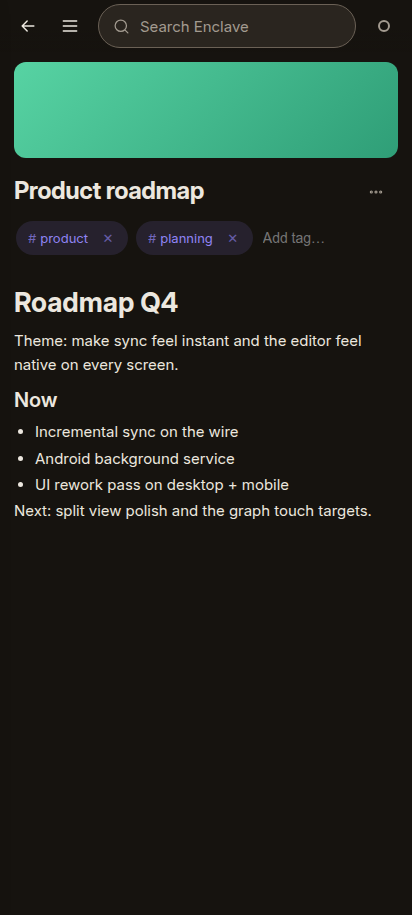
Four note layouts, a create stack on the FAB, folders in the drawer and the full block editor. The same encrypted core, on a phone.
arm64 · signed APK · beta
Screenshots from the current Android build.
Security model
There is no backend to trust, no account to leak and no relay that sees your notes. The only copy of your key is the one derived on your device.
Read the security modelEvery page, block, search index and embedding lives inside one encrypted SQLCipher database. Keys are stretched with Argon2id before anything is opened.
SQLCipher AES-256-CBC + HMAC-SHA512Argon2id 64 MiB, 3 passes, 4 lanesBIP39 12-word recovery phrasePeers find each other only on the local network. A challenge-response handshake proves both sides hold the same vault-derived key; then every frame is sealed.
mDNS local discovery, no directoryWebSocket device-to-device transportXChaCha20-Poly1305 authenticated framesEnclave never checks for updates unless you turn it on. Each update is shown with its changelog and must be downloaded and verified before the installer can run.
Opt-in no background update checksSHA-256 artifact digestEd25519 pinned release keyNo account, no analytics, no crash reporting and no license check. The optional assistant contacts only the endpoint you configure — or nothing at all.
No account no identity serverNo telemetry no analytics SDKNo relay data stays on your networkRoadmap
No dates dressed up as deadlines. Each phase ends when its exit criteria are met, and the stable release stays supported while the native apps land.
In progress
The Compose app runs on the same Rust core as the desktop app. The remaining work is confidence, not a rewrite.
Exit criteria
A published parity checklist, background sync measured on a real phone, and a TalkBack pass on the primary flows.
Decision gate
Once the desktop stack gate closes, the native shell follows on the same core — with the platform integration a webview cannot give.
Exit criteria
Feature parity with the desktop Tauri app, a screen-reader and keyboard-only pass, and signed updates verified on all three OSes.
Criteria-gated
Parity is proven by interop tests, not manual demos. The native apps ship alongside the Tauri app until every surface matches, then the webview shell is retired.
Exit criteria
A v1.13 vault opens in both native apps, syncs with an unmodified Tauri app, and the Tauri app can be removed without losing features or data.
Deliberately not planned
iOS is not in this plan, though the versioned contract is designed not to preclude it. There is no cloud relay, account or telemetry, no shared UI framework between the apps, and no rewrite of the vault, crypto or sync protocol.
Criteria-driven, never calendar-driven. A phase ends when its exit criteria are met. Read the full plan
Questions
The short version: no server, no account, no telemetry. If something here is still unclear, the full documentation is in the repository.
No. Creating, editing and searching work entirely offline. Sync uses your local Wi‑Fi. The optional assistant can use a local endpoint that never touches the internet, and update checks are strictly opt-in.
In one encrypted SQLCipher vault on your device. Backups are still-encrypted snapshots, and there is no server that holds a copy. The desktop app can export Markdown and HTML when you want a portable copy.
Use the 12-word BIP39 recovery phrase you saved when the vault was created. If both the password and the phrase are lost, the vault cannot be decrypted — there is no recovery server, by design.
Yes. Devices on the same network discover each other over mDNS and authenticate with the vault-derived sync key. If your network blocks mDNS, add a peer manually by address from the sidebar.
Yes, MIT licensed. The code, decision records and security model are in the repository, and you can build from source. The website itself is a static page with no analytics.
The native Android app is part of the move away from the old webview shell. It builds, signs and runs the same encrypted core, but real-device sync, widgets and a TalkBack pass are still tracked as open work.
Only the prompt and page context you ask it to use, and only to the endpoint you configure. With a local endpoint such as Ollama, nothing leaves your machine; Enclave has no cloud AI service. The homepage demo uses sample answers and sends nothing.
No. There is no Enclave relay: devices discover each other on the same local network and sync directly. If mDNS is blocked, add a peer by address. Remote sync is not part of the current plan.
Download
One vault, every device you own. Download the latest stable release, then let your devices find each other on your Wi‑Fi — no server in between.
Download Enclavex86_64 · .deb or .AppImage
x86_64 · .msi or .exe
Apple Silicon · .dmg
arm64 · signed .apk
Every release ships with checksums. Updates are opt-in and verified against a pinned Ed25519 release signature before the installer is allowed to run.
Building the next Enclave. The latest stable release above is the supported product while the dedicated native apps are built. Read the plan
Make the .AppImage executable and run it, or install the .deb with your package manager. The build is x86_64.
Run the .exe installer or the .msi. If SmartScreen appears, verify the checksum before choosing to run it.
Open the .dmg and drag Enclave into Applications. If Gatekeeper blocks the first launch, use Open from the context menu. Apple Silicon.
Download the signed .apk on the phone, allow installs from that app when Android asks, then open the file. arm64; no Play Store.
Download SHA256SUMS from the release to verify a manual install: sha256sum -c SHA256SUMS on Linux, or shasum -a 256 -c SHA256SUMS on macOS. Updates are separately checked against the pinned Ed25519 signature before installation.
Documentation
Enclave is MIT licensed. Read how it works, how it is tested, and why it is built this way — including the decisions that were reversed.